Click & Collect · Delivery · inshop Online Grocery
In-store pickup or home delivery.
You decide how you sell.
Two modes, one platform. Switch on Click & Collect for in-store pickup, delivery for home drop-off — or both. Each store decides for itself what to enable.
Lombardy
Free
MI, BG, BS, CO…
Central Italy
€5.00
RM, FI, PG, AN…
Islands
Blocked
CA, PA, CT, ME…
100%
control over the configuration
4
calculation criteria available
∞
unlimited zones and tiers
Click & Collect · inshop Online Grocery
The customer orders online.
Collect in store whenever they like.
In-store pickup is the fastest, most cost-effective way to offer online grocery with no delivery costs. The customer picks the shop, chooses a time slot and comes to collect — your team prepares the order.
An order from the app or the site
The customer browses their nearest store's catalog, adds products to the cart and chooses when to come and collect.
Configurable time slots
Every store sets its own pickup slots — by day, by time and by the maximum number of orders.
Prepared in store
The team receives the order, prepares the products and marks it ready. The customer gets the notification.
No delivery costs
No logistics to run, no shipping costs to work out. Click & Collect is the simplest way to start.
Delivery module · inshop Online Grocery
Your delivery panel.
Everything under control.
A dedicated dashboard to manage zones, rates, tiers and calculation criteria. Switch home delivery on in one click — and configure it however you like.
Choose the calculation criterion
Calculated shipping cost
3,90 €
A €45 cart → the 30–60 tier → €3.90
Tier found · Price applied at checkout
Switch delivery on in one click
You decide where you deliver, when and at what price. Switch delivery on across the whole country or just your own area — and change your mind whenever you like.
You decide how far you go
Create unlimited zones by postcode or province. Cover just your own area, the whole region or the entire country. Block the areas you don't want to serve.
You set the rules
Four calculation criteria (order value, weight, quantity, volume), progressive tiers, free shipping above a threshold. Every zone follows your logic.
You control every order
If a postcode isn't covered, the order is blocked automatically. No surprises, no deliveries you didn't plan for. Every rate is validated before checkout.
Every detail is configurable.
Every rule is yours.
Geographic zones to suit you
Each zone groups one or more destinations (postcodes or provinces) with its own pricing rules. You can create unlimited zones — for example a Lombardy zone at a reduced price and an Islands zone with a surcharge, or blocked entirely.
Four calculation criteria
Choose how shipping is calculated: by cart Value (€), Weight (kg), Quantity (number of items) or Volume (cm³). Each zone can use whichever criterion suits its business best.
A Default Zone always in place
There is always a Default Zone acting as a fallback: if the customer's destination doesn't fall into any specific zone, the system applies the Default Zone's rules. It cannot be deleted.
E-commerce and stores kept separate
Zones are managed in two independent contexts: Virtual stores for e-commerce sales with home delivery, and Physical stores for delivery from the real shops (inshop Online Grocery).
Block where you don't deliver
Switch on the Block shipping flag on a zone to refuse orders to those destinations. You can block specific areas, or switch blocking on for the Default Zone so only the destinations you explicitly configured are accepted.
Contiguous, validated tiers
The From value of each tier matches the To value of the previous one. The system keeps the tiers contiguous automatically and blocks saving if there are overlaps or gaps in the range.
How shipping
is calculated.
Three automatic steps, from the customer's postcode to the final price.
Find the zone
The system first looks for a direct match on the customer's postcode (high priority). If it finds none, it checks whether the province derived from the postcode is covered by a zone (medium priority). If the province doesn't match either, the Default Zone is used as a fallback.
Apply the criterion
Once the zone is found, the system checks whether the cart value (order value, weight, quantity or volume, depending on the zone's criterion) falls into one of the configured tiers. If the cart is empty, shipping is always €0.
Return the price
If a tier matches, that price applies. If no tier matches, the zone's Default price applies. If the default price is empty too, the system falls back to the Default Zone.
Warning: if a specific zone uses the Weight criterion and the Default Zone uses Order value, the system cannot convert the calculation and blocks the shipment. To avoid it: use the same criterion across every zone, or always set a Default price on the specific zones.
Configuration examples.
Here is how banners use zones to run delivery in the way that suits their own territory.
Standard shipping across the country at €6.90, free from €49 upwards.
Configuration
Default Zone, Order value criterion
Tier 1: €0 → €49 = €6.90
Tier 2: €49 → unlimited = €0.00 (free)
Result
€25 cart → €6.90 / €49 cart → free
How the tiers work.
Each tier has a From value (inclusive), a To value (exclusive) and a Price. For example, the 0–50 tier covers values from 0.00 to 49.99. Exactly 50.00 falls into the next tier.
When you change a tier's To value, the next tier's From is updated automatically. Tiers must be contiguous: no gaps, no overlaps.
Tick the Unlimited last tier checkbox on the final tier to cover any high value without setting an upper limit. The To field is set to the technical value 999,999.99.
If the cart value doesn't fall into any tier, the system applies the zone's Default price. If that is empty too, it falls back to the Default Zone.
Frequently asked questions.
The Default Zone is always there. If you set no criterion, no default price and don't block it, the shipping price is €0 (free).
No. Within the same context (virtual or physical), a postcode or province can belong to only one zone. The system prevents duplicates when saving.
Shipping is always €0. Zone rules are not applied. That is the correct behavior for the preliminary calculation before products are added.
Yes. Zones are kept separate for the two contexts — Virtual stores and Physical stores — and are configured completely independently.
The postcode always wins. The system checks the exact postcode match first, then the province. That allows granular rules: for example an Italy zone across the whole province of Milan, plus a Milan centre zone with a special price only for postcodes 20121–20125.
If a specific zone uses Weight and the Default Zone uses Order value, the system cannot convert the calculation and blocks the shipment. To avoid it: use the same criterion across every zone, or always set a Default price on the specific zones.
The next tier applies. The To value is exclusive: with a 0–50 tier, €50.00 falls into the tier starting at 50.
Every destination in that zone goes back to being covered by the Default Zone. Check first that the fallback is configured correctly. The Default Zone cannot be deleted.
Yes. Once saved, the new rules apply immediately to new orders. Orders already confirmed keep the shipping price calculated at the time of purchase.
From the zone card, in the Destinations section, in three ways: entering a single postcode or several separated by commas, selecting a province, or searching for a town (if it has several postcodes a selection window opens). Postcodes appear as blue pills, provinces as yellow pills.
Bring delivery to your banner.
Request a demo.
Zones, rates, tiers — all configurable on your own. No technical constraints and no hidden costs.
Real screenshots
The inshop experience, live.
Screens captured from a live inshop store: catalog, store details, pickup booking and order confirmation.
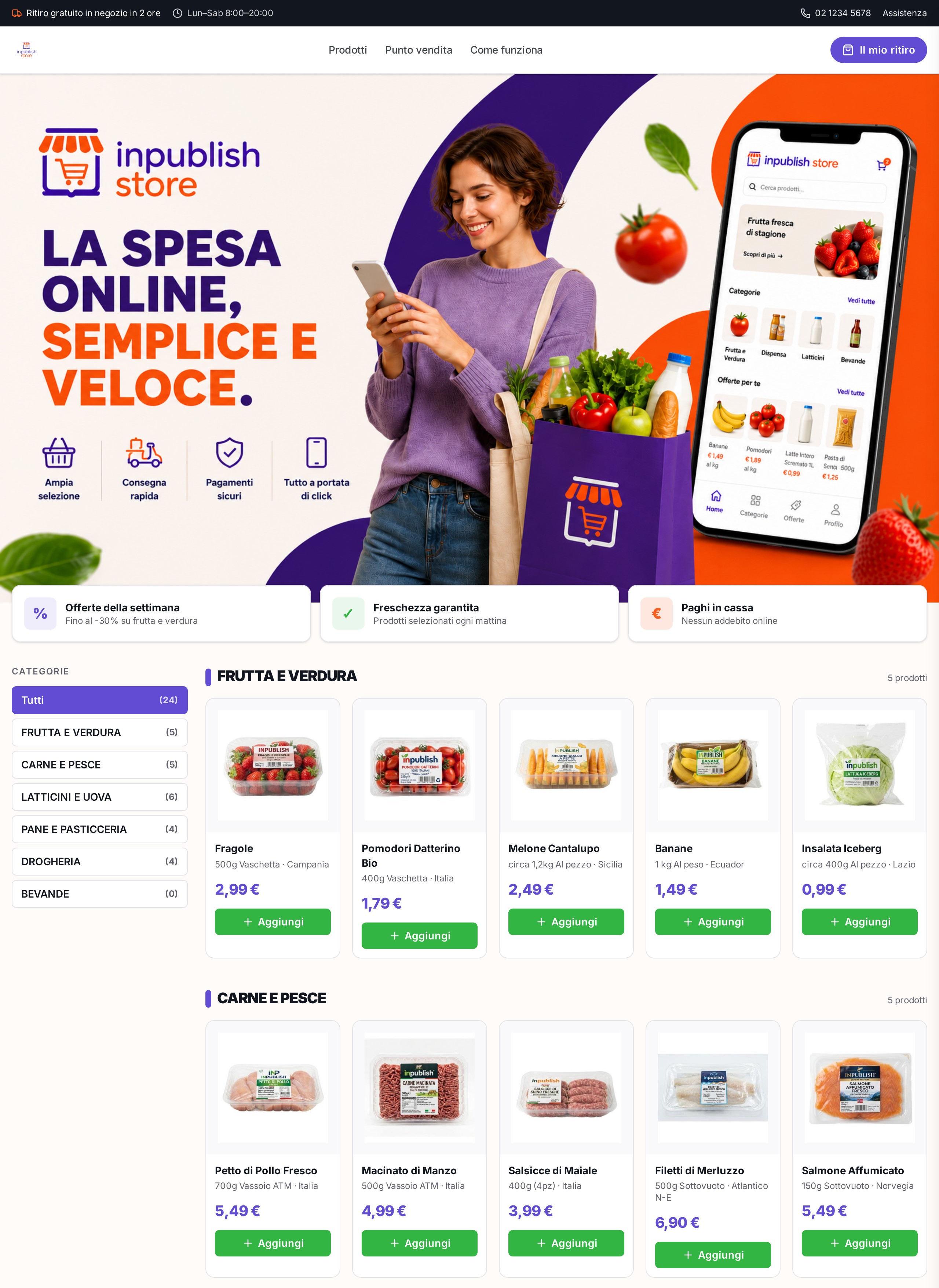
Home & catalog
Categories, offers and fresh products in a clean storefront.
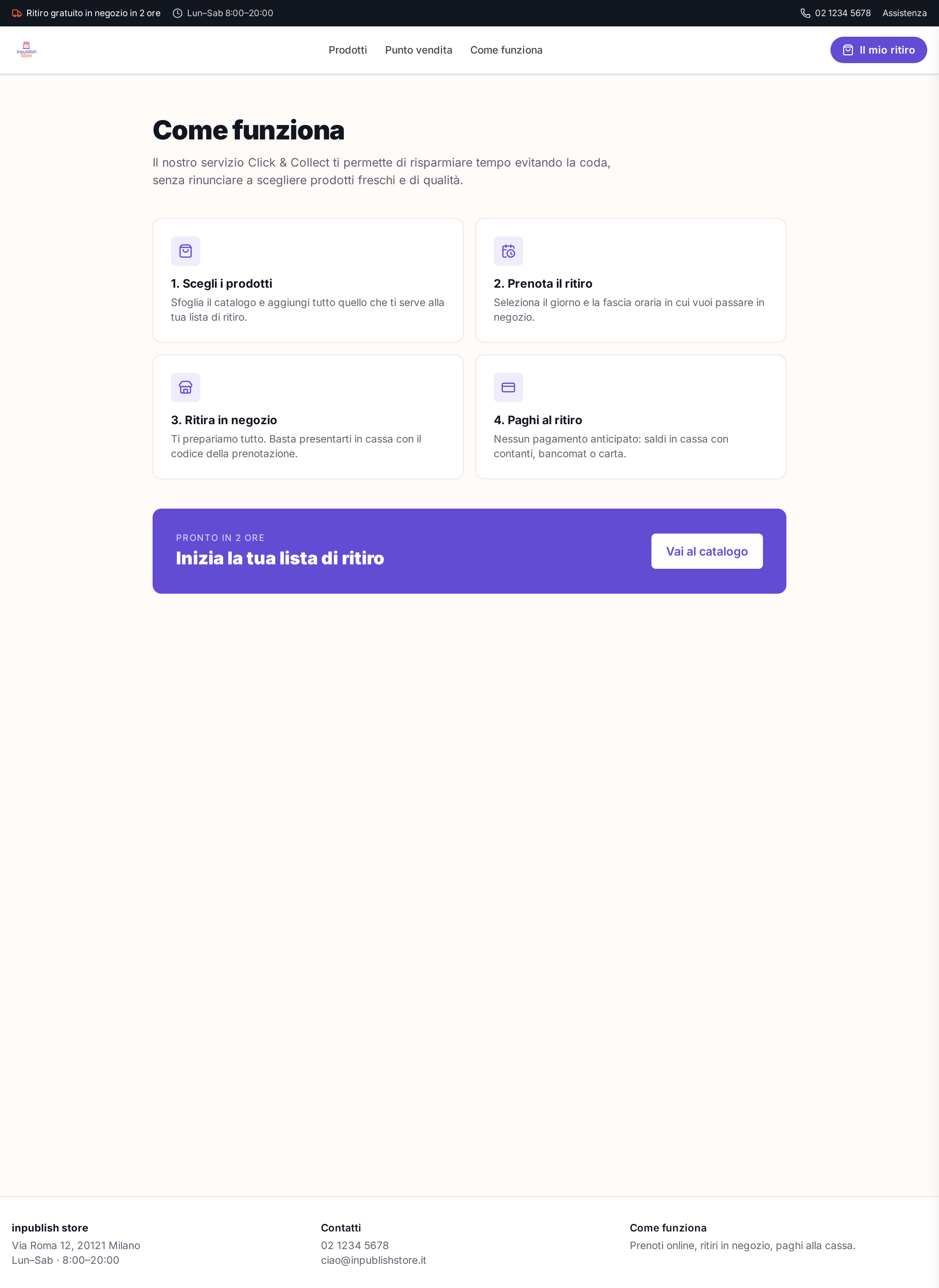
How it works
Click & Collect flow explained in 4 clear steps.
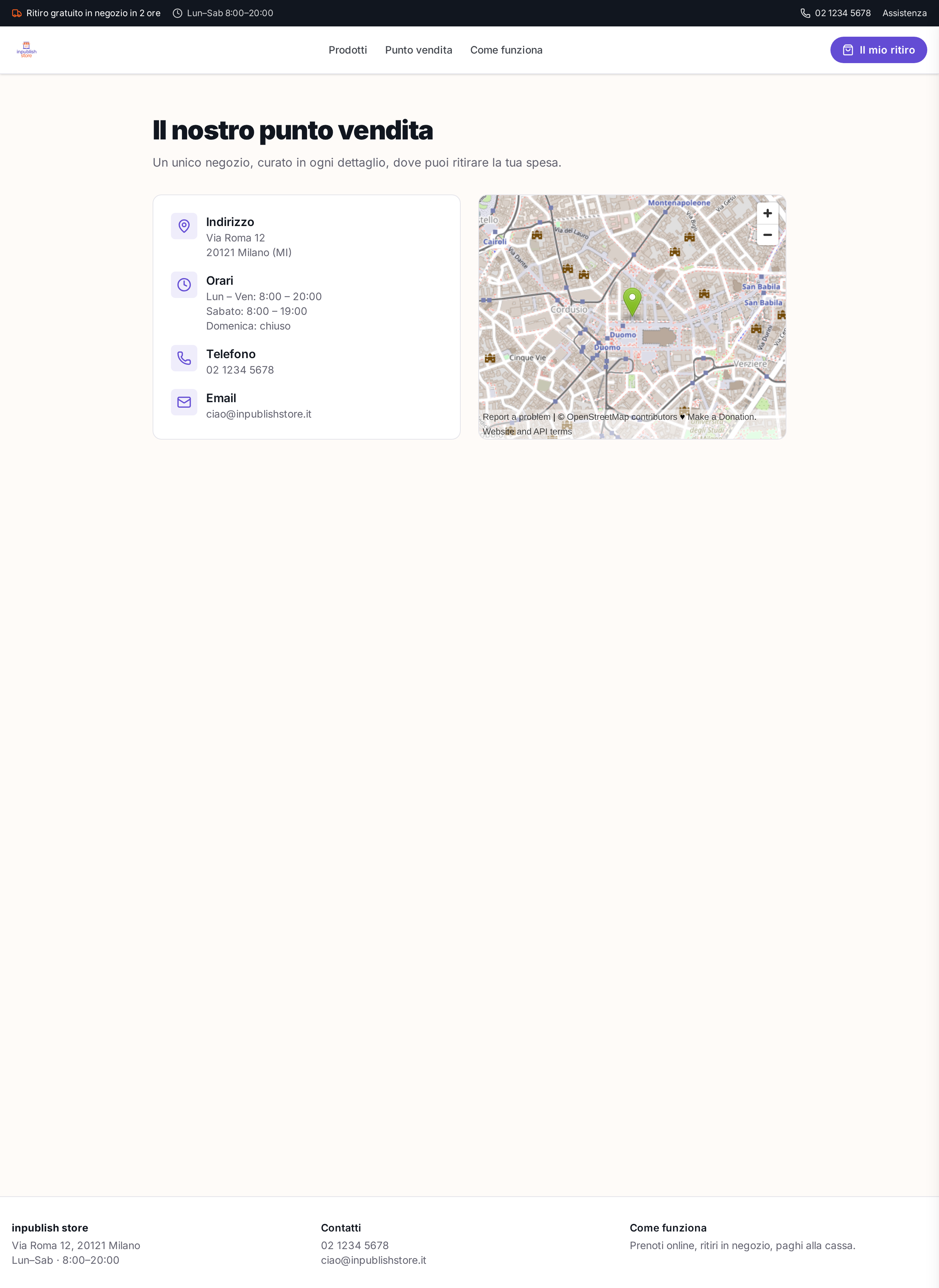
Store details
Store card with address, hours, map and contacts.
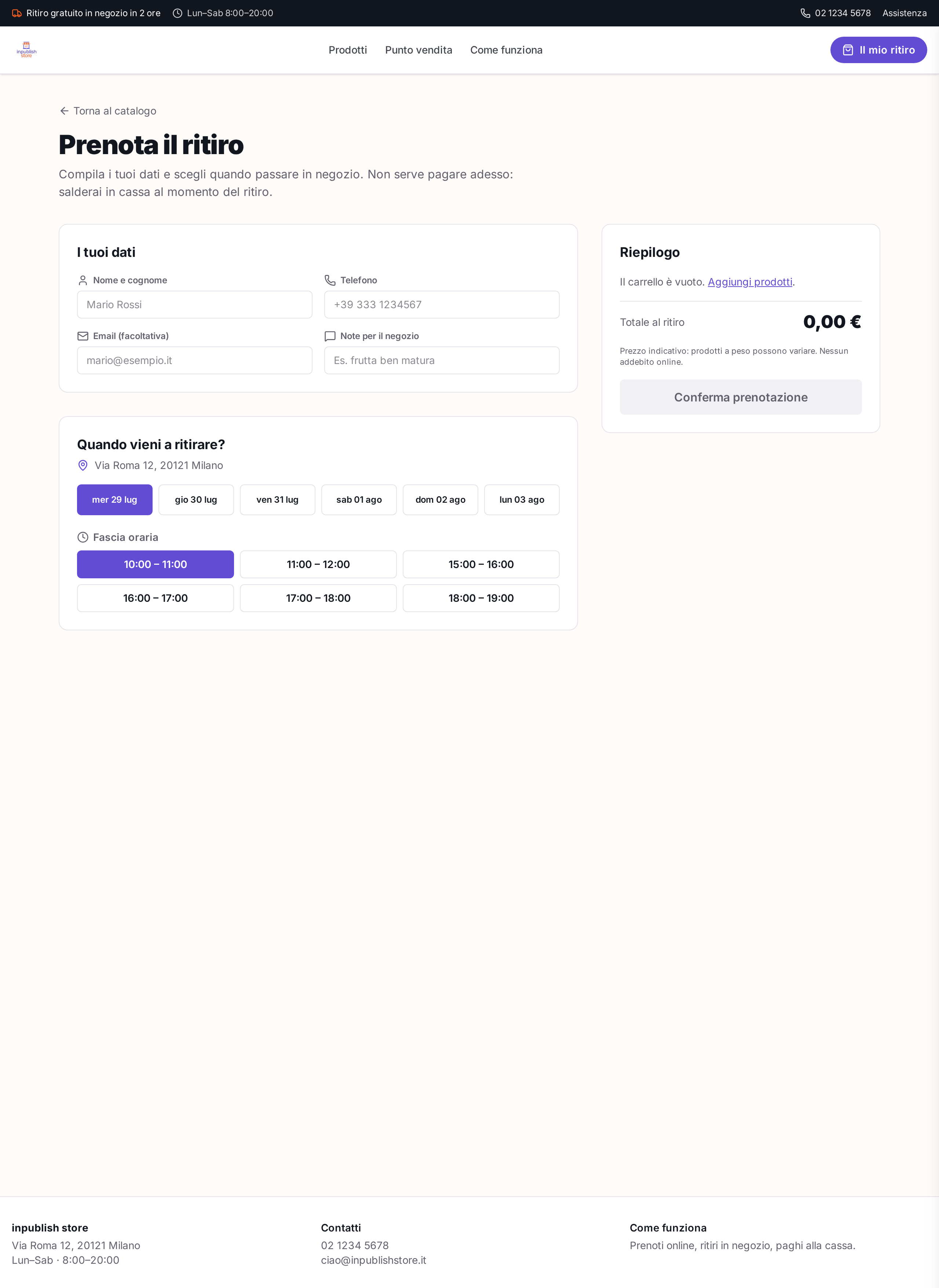
Pickup booking
Time slots, customer details and cart summary.
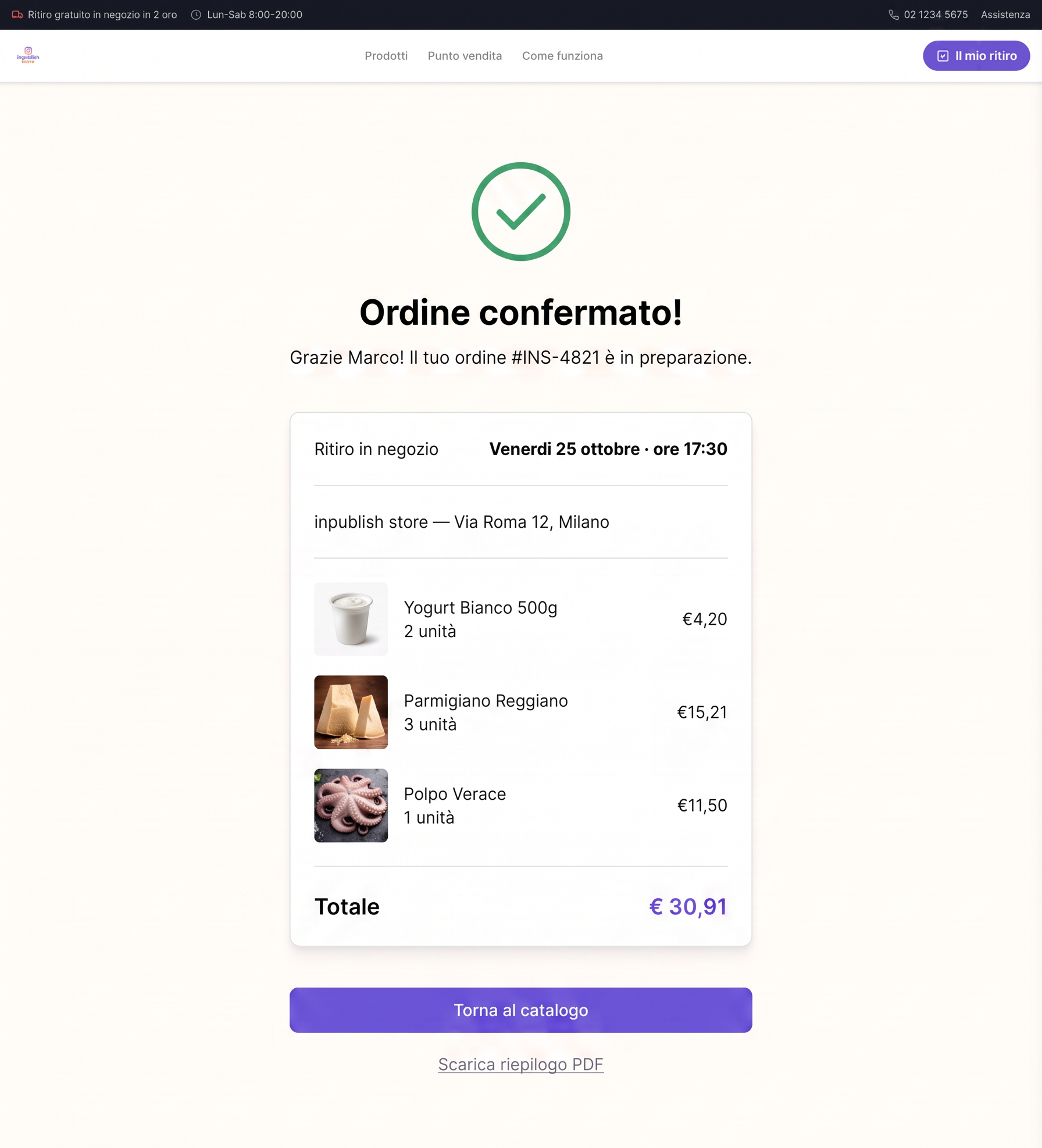
Order confirmation
Confirmation notice ready for in-store pickup.